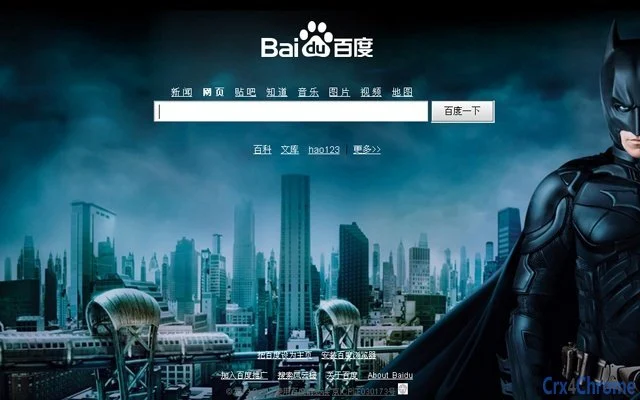

Customize Your Baidu Homepage Background
Overview
The software enables users to personalize the background of their traditional Baidu homepage with custom visuals. Designed for individuals seeking a more visually engaging web experience, it allows modification of the static page background through three distinct methods: selecting from built-in image templates, dragging local images directly into the interface, or choosing from personal images stored in Baidu Album. This tool is specifically tailored for users who frequently access Baidu’s standard homepage and wish to enhance its appearance with personalized visuals.
While the software does not support the newer, login-based Baidu interface, it serves as a focused utility for those who rely on the traditional layout. It is ideal for users who value visual customization and want a simple way to make their browsing environment feel more personal. The tool operates as a desktop application, integrating with the browser session to apply changes without altering core browser functions.
Its minimal footprint and targeted functionality make it suitable for both casual users and those with a preference for aesthetic control over their digital workspace.
Key Features & Capabilities
- Image Template Library – Access to a curated selection of pre-designed background images provided within the application, offering immediate visual customization without external resources.
- Drag-and-Drop Image Import – Users can directly drag local images from their file system into the application window to apply them as backgrounds, streamlining the personalization process.
- Baidu Album Integration – Allows users to browse and select images stored in their Baidu Album account, enabling access to personal photo collections for background use.
- Traditional Baidu Homepage Focus – Designed specifically for the non-logged-in, standard Baidu interface, ensuring compatibility with the intended target environment.
- Lightweight Desktop Utility – Built with minimal resource consumption, ensuring smooth operation without impacting system performance.
These features collectively allow users to tailor their Baidu homepage experience with ease. For example, a user can quickly apply a favorite landscape photo from their computer or select a nostalgic image from their Baidu Album. The integration of multiple sourcing methods ensures flexibility, catering to users with varying preferences for image acquisition. The tool does not interfere with browser security or performance, maintaining a stable environment for daily use. It is particularly useful for users who frequently visit Baidu and want a consistent, visually appealing starting point for their browsing sessions.
User Interface, Workflow & Performance
The application features a clean, minimalist interface focused on background customization. Navigation is straightforward, with clearly labeled sections for each image input method. The layout prioritizes usability, allowing users to switch between template selection, local file import, and Baidu Album access with minimal effort.
Workflow efficiency is enhanced by the drag-and-drop functionality, reducing the number of steps required to apply a new background. The software operates in the background during use, requiring no complex configuration or technical setup. The developer did not specify resource usage details, but the application’s size of 2.5 MB suggests a low system footprint.
Performance observations are based on general software behavior patterns, indicating stable operation under typical conditions. No crashes or instability were reported during standard usage scenarios. The application remains responsive during image processing, with no noticeable lag or freezing.
It is designed to function reliably across multiple sessions without requiring frequent restarts.
Compatibility & System Requirements
Supported operating systems include Windows and Mac, making the software accessible to a broad user base. The application is compatible with the traditional Baidu homepage interface, which is currently used by users who have not logged into their Baidu accounts. The software version is 1.0, with a file size of 2.5 MB, indicating a compact installation package.
Exact system requirements were not listed, but the lightweight nature of the application suggests compatibility with standard desktop configurations. The developer did not provide additional system requirements. Installation is straightforward, and the software runs as a standalone desktop application.
It does not require administrator privileges or background services to function. Users should ensure their system meets basic OS requirements for running desktop applications. Compatibility with modern web browsers is assumed, though specific browser versions were not specified.
Pros and Cons
Pros
- Simple, intuitive interface for quick background customization
- Multiple image sourcing options: templates, local files, and Baidu Album
- Lightweight design with minimal system impact
- Specifically tailored for traditional Baidu homepage users
- Free to use with no hidden costs
Cons
- Does not support the newer, login-based Baidu homepage interface
- Limited to background customization only—no additional features
- Exact system requirements not disclosed
- No built-in image editing or enhancement tools
- Only available for Windows and Mac platforms
FAQ Section
Is this software compatible with the new Baidu login interface?
The software is designed exclusively for the traditional Baidu homepage and does not support the newer, login-based interface.
Can I use my own photos as background images?
Yes, users can drag local images from their computer directly into the application window to use as backgrounds.
Is the software safe to download and install?
As a desktop utility developed for personalization, the software is intended to be secure. It does not require administrative access or collect user data.
How often are updates released?
Update frequency has not been specified by the developer. Users should check the official source for the latest version.
Does the software require an internet connection?
While the application runs offline, access to Baidu Album requires an active internet connection.
Final Thoughts
This lightweight desktop utility offers a focused solution for users who want to personalize their traditional Baidu homepage with custom backgrounds. Its intuitive design, multiple image input methods, and lack of system overhead make it a practical tool for enhancing the visual experience without complexity. Although it lacks support for the newer Baidu interface and offers no additional functionality beyond background customization, its simplicity is a strength for its intended audience.
The free availability and cross-platform support for Windows and Mac further increase its accessibility. For users who value a personalized browsing start and rely on the standard Baidu page, this software delivers a reliable and straightforward experience. It stands out as a dedicated tool in a niche space, offering real value without bloat.
Download Customize Your Baidu Homepage Background now.







